


Sonoff
Smart home kit, 4 touch plates for the 503 box, for wiring with a neutral at the switch
Smart home kit, 4 touch plates for the 503 box, for wiring with a neutral at the switch
Su Amazon.it · Impianti italiani (scatola 503) · Elettricista
Regular price
€62.50
Regular price
Sale price
€62.50
Unit price
per
Free shipping to Italy
Minimum order €400 excl. VAT
Indicative price: sum of the Amazon.it prices recorded on 22/09/2026. The kit is bought on Amazon, not from us.
Add the whole kit to your Amazon cart
Indicative price: the sum of the Amazon.it prices recorded on 22/09/2026; prices on Amazon can change. Delivery, returns and warranty are shown on Amazon at checkout. As an Amazon Associate, Litio Store earns from qualifying purchases.

Smart home kit · Italian installations, 503 box
Sonoff TX Gen2 touch switch kit for 503 boxes with neutral, 4 faceplates
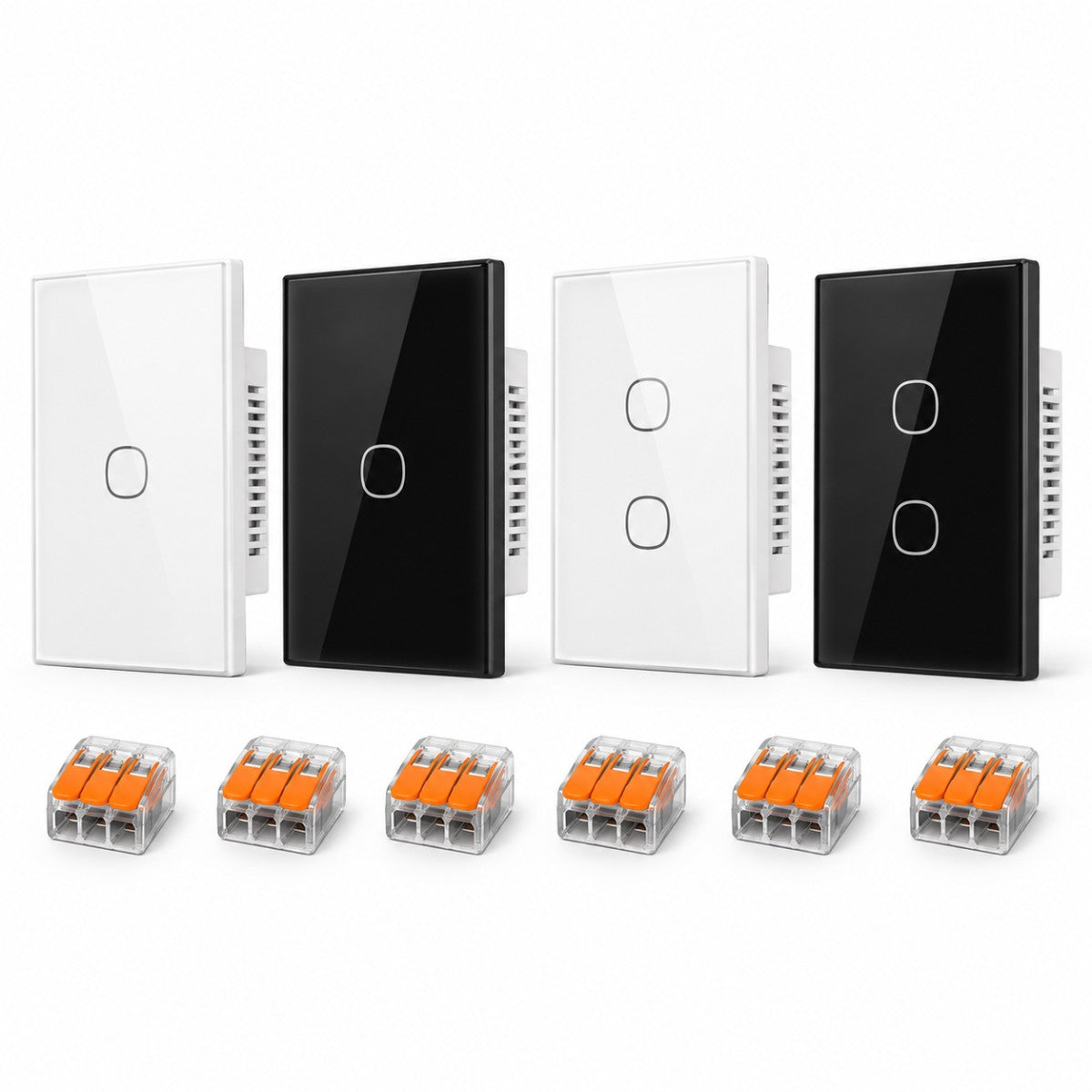
Four Sonoff TX Gen2 type 120 touch plates for 503 boxes, two single-channel and two two-channel, replace the existing inserts and control six lights. The version with neutral, Wi-Fi with no hub: you touch them like a switch and manage them from the eWeLink app, with Alexa, Google and timed schedules.
Sonoff devicesWi-Fi, no hubInstallation by an electricianBuy it on Amazon.it
Kit put together by Litio Store — buy it on Amazon.it. This is one of the smart home kits in the Domotica Smart section: you buy the products on Amazon from a basket we have already filled, at Amazon's prices on the day, and we earn a small commission at no extra cost to you. For professional LoRaWAN installations see the Milesight kits in the same section; for a kit built to order, get in touch through the contact page.
Who it is forAnyone who wants to swap the inserts in 503 back boxes for smart touch plates.
What you monitorSix lights: two single-channel plates and two two-channel plates.
How you control itA touch on the plate, the eWeLink app, Alexa, Google and schedules.
InstallationBy an electrician: the switch inserts in the 503 boxes are replaced, with a neutral in the box.
What it does
- The two single-channel faceplates replace the inserts in rooms with a single lighting point, such as the bathroom or the hallway.
- The two two-channel faceplates control two lights from the same box, the living room's chandelier and spotlights for example.
- Each channel switches on and off at a touch of the plate, like a conventional switch.
- In the eWeLink app you switch the lights from away, build scenes and set schedules.
- With the eWeLink skill the lights answer Alexa and Google voice commands.
More rooms, two-way switches, back boxes without a neutral or faceplates to match in colour? Get in touch via the contact page with the list of switch positions and we will propose the right configuration.

1One-gang Sonoff TX Gen2 touch plate for a 503 box, in place of the bathroom or hallway insert. Two in the kit.
2Two-gang Sonoff TX Gen2 touch plate for a 503 box, in place of the living room or kitchen insert. Two in the kit.
How it is installed
Wi-Fi network and checks. The faceplates join the home Wi-Fi on 2.4GHz, with no hub. Before buying, check two things: that there is a neutral in the 503 boxes, because this is the version with a neutral, and that the router signal is good at the switch positions. Count the channels too: a two-channel faceplate is needed where there are two keys today.
Touch plates. Switch off at the main breaker, take off the existing plate and inserts and note which conductor goes to which light. Wire live, neutral and the lamp returns to the faceplate terminals as the manufacturer's diagram shows, then fix it to the 503 box. 230V connections must be made by qualified personnel, with the installation isolated.
Connections with Wago connectors. The Wago 221 lever connectors in the kit are for bringing the neutral to the faceplate when there is only one conductor in the box to take it from, and for joining conductors tidily. Dress the cables into the back of the box before fixing the faceplate, without crushing them against the module.
eWeLink app. Switch the supply back on, download the eWeLink app and add the plates one at a time following the wizard, usually by holding a button until the LED flashes. Name each channel after the light it controls, such as “ceiling light” or “spotlights”. Then link the eWeLink account to Alexa or Google Home.
Recommended automations. Set up an "out" scene that switches every light off with a single command from the app or by voice. Add a schedule that switches the hallway lights off at a set time at night. If you like, use an evening scene that switches on only the living room lights when you get home.
Contents verified. The four Sonoff TX Gen2 faceplates are from the same range and are managed in the same eWeLink app, with the same scenes and the same voice assistants. They are type 120 for the Italian 503 box, in the version with a neutral. The kit includes the Wago lever connectors for the faceplates' connections, useful above all for taking the neutral off.
What's in the kit

| Qty | Item | Unit price | Subtotal |
|---|---|---|---|
| 2 | Sonoff TX Gen2 touch 1-channel 503Wall-mounted switch | 16,30 € | 32,60 € |
| 2 | Sonoff TX Gen2 touch 2-channel 503Wall-mounted switch | 17,33 € | 34,66 € |
| 1 | Wago 221-413 lever connectors, 10 piecesAccessory: connections · module connections | 8,99 € | 8,99 € |
| Kit total | 76,25 € |
Prices taken from Amazon.it on 22/09/2026: they can change, and the price Amazon shows at the time of purchase is the one that applies.
Add the whole kit to your Amazon basket3 items, 5 pieces · optional extras are added from the individual linksDelivery, returns and warranty: Amazon shows these when you buy.
Before you order
Do you need a hub?
No. The Sonoff TX Gen2 plates connect straight to the home Wi-Fi on the 2.4GHz band and are managed in the eWeLink app. A router with a decent signal at the switch points is enough: there is no bridge to buy.
Does it work with Alexa and Google?
Yes, through the eWeLink app: you link the eWeLink account in the Alexa app or in Google Home and the lights show up among the devices, to switch on and off by voice or to put in routines. The scenes you build in eWeLink stay available with no assistant at all.
Do you need an electrician?
Yes. The faceplates replace the existing inserts in the 503 boxes and have to be wired with a neutral. 230V connections must be made by qualified personnel, with the installation isolated. Setting things up in the app, though, you can do yourself on your phone.
What if there is no neutral in the box?
This is the version with neutral: without a neutral in the box it will not work. The electrician can bring one across from the junction box, if there is a spare conductor or one can be pulled in. There are also modules that work without a neutral: get in touch through the contact page and we will suggest the right kit.
What happens if there is no internet?
A touch on the faceplate still switches the lights on and off, like an ordinary switch. Control from outside, the voice assistants and scenes in the eWeLink cloud resume once the connection is back.
Can I add more plates?
Yes. The eWeLink app handles plenty of Sonoff devices together: you can add more TX faceplates from the same range or modules behind the inserts, and put them in the same scenes. Get in touch through the contact page for a build we have checked.
Are batteries included?
Not needed: the plates are powered from the 230V circuit in the back box. The kit contains no remotes or battery sensors; if you add a wireless button or a sensor later, the batteries follow the manufacturer's specifications.
What if a product is out of stock on Amazon?
It happens, above all with some variants. Get in touch through the contact page quoting the kit code and the item that is missing: we will point you to an alternative that works with the other parts, so you keep a combination we have checked and you do not have to hunt for a substitute that fits the rest.
Why buy on Amazon?
We put the kit together and checked it ourselves, choosing parts that work with each other. Purchase, payment, returns and warranty are handled by Amazon, item by item: delivery times, returns and warranty are shown on Amazon when you buy, under each product seller's own terms.
Notes
Not included
- A Wi-Fi router and an internet connection
- 503 boxes and a neutral conductor, if there is not one
- Lamps and lighting points
- Electrician's labour
As an Amazon Associate, Litio Store earns from qualifying purchases.