


Shelly
Smart home kit, Z-Wave lights and roller shutters with PoE coordinator away from the board
Smart home kit, Z-Wave lights and roller shutters with PoE coordinator away from the board
Kit smart home su Amazon.it · Z-Wave e lungo raggio · Elettricista
Regular price
€349.89
Regular price
Sale price
€349.89
Unit price
per
Indicative price: sum of the Amazon.it prices recorded on 22/09/2026. The kit is bought on Amazon, not from us.
Add the whole kit to your Amazon cart
Indicative price: the sum of the Amazon.it prices recorded on 22/09/2026; prices on Amazon can change. Delivery, returns and warranty are shown on Amazon at checkout. As an Amazon Associate, Litio Store earns from qualifying purchases.

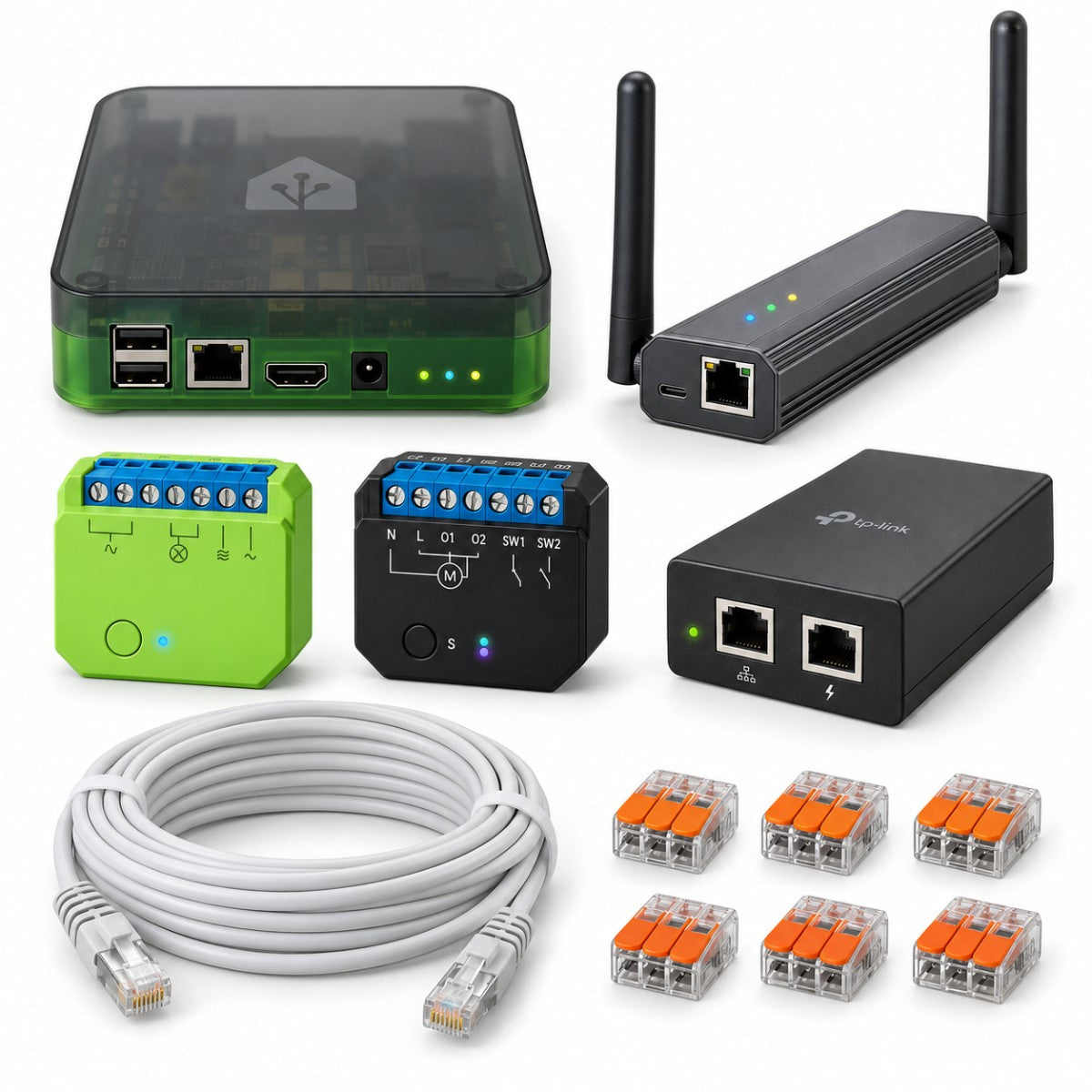
Smart home kit · Z-Wave and long range
Z-Wave over a PoE network for remote panels, with Home Assistant
Home Assistant Green stays next to the router, while the Z-Wave radio, the Sonoff Z-Wave 800 PoE Max dongle, is taken on a network cable to the best spot in the building and powered by the PoE injector. The kit holds one Shelly Wave Dimmer LR and one flush-mounted Wave Shutter for one dimmable light and one roller shutter. Built for professional installations.
Shelly Wave and Sonoff devicesZ-Wave radio on a PoE networkInstallation by an electricianBuy it on Amazon.it
Kit put together by Litio Store — buy it on Amazon.it. This is one of the smart home kits in the Domotica Smart section: you buy the products on Amazon from a basket we have already filled, at Amazon's prices on the day, and we earn a small commission at no extra cost to you. For professional LoRaWAN installations see the Milesight kits in the same section; for a kit built to order, get in touch through the contact page.
Who it is forInstallers, and buildings where the router is a long way from the area to be automated.
What you monitorOne dimmable light and one motorised roller shutter, on a Z-Wave network you can extend.
How you control itHome Assistant app, wall push-buttons, local automations; voice assistants through Home Assistant.
Installation230V modules in the back boxes plus a network cable: electrician's work.
What it does
- The Sonoff Z-Wave PoE Max dongle joins the network with a single cable, which also carries power through the PoE injector: it can be installed in the middle of the building or near the distant boards.
- Home Assistant Green, next to the router, reaches the dongle over the home network and runs the Z-Wave network locally.
- The Shelly Wave Dimmer LR dims a dimmable light from the existing button and from the app.
- The Shelly Wave Shutter drives a motorised roller shutter, with opening as a percentage once calibrated.
- Local automations in Home Assistant: schedules, scenes, app control from away as well.
For more floors, warehouses, offices or a larger number of lights and roller shutters, get in touch from the contact page: we will build the kit with the modules and quantities that suit the building.

1Home Assistant Green next to the router, wired with a network cable: it runs devices, automations and the app.
2Sonoff Z-Wave 800 PoE Max dongle central to the building, connected with the network cable: this is the Z-Wave radio.
3TP-Link TL-POE160S PoE injector next to the router: it powers the dongle over the network cable.
4Shelly Wave Dimmer LR in the box behind the light switch: it dims that lighting point.
5Shelly Wave Shutter in the box behind the roller shutter push-button: it drives the motor.
How it is installed
Home Assistant and network-attached radio. Home Assistant Green goes next to the router, wired with the network cable. The PoE Max dongle is fixed in a central spot or close to the area it has to serve, high up and away from metalwork. The 10-metre Cat6 cable included runs from the dongle to the PoE injector, which in turn goes to the router. In Home Assistant the Z-Wave integration is set up by entering the dongle's network address, as the manufacturer instructs.
Flush-mounting modules. With the installation isolated at the main board, the Wave Dimmer LR goes behind the light switch and the Wave Shutter behind the roller-shutter double push-button, wired to the two motor phases, following the manufacturer's diagrams. Work on 230V must be carried out by qualified personnel. Lamps must be dimmable and within the dimmer's maximum power.
Connectors, back boxes and network. The joints are made with the Wago lever connectors included. If the module will not fit behind the switch insert, use a deep 503 box or the junction box, both optional in the kit. The network cable is run in its own trunking or conduit for data cables, not alongside the 230V conductors. Runs longer than 10 metres need a longer cable.
Pairing. In Home Assistant you add the two Z-Wave modules by scanning their QR code (SmartStart) or with the manufacturer's inclusion procedure: it pays to photograph the codes before you close the boxes. Then calibrate the shutter from the module options, set the dimmer's minimum and maximum levels, name everything and install the Home Assistant app.
Recommended automations. Shutter up in the morning and down at sunset. Light dimmed to 30 per cent in the evening and off at midnight. A “closing up” scene that switches the lights off and lowers the shutter. A notification if the Z-Wave dongle stops answering, so you spot a problem with the cable or the PoE supply straight away.
Contents verified. The Sonoff Z-Wave 800 PoE Max dongle connects to Home Assistant Green over the network and runs the kit's Shelly Wave Z-Wave modules. The TP-Link TL-POE160S injector is there to power the dongle through the cable, and the 10 m Cat6 network cable for the run to the router. Then there are the Wago 221-413 lever connectors for the module joints; the deep 503 boxes are optional and only needed if a module will not fit behind the switch; the Gewiss junction box, also optional, is the alternative for putting the modules in the junction box instead of behind the switch.
What's in the kit

| Qty | Item | Unit price | Subtotal |
|---|---|---|---|
| 1 | Home Assistant Green – universal local smart home hubCoordinator | 223,46 € | 223,46 € |
| 1 | Sonoff Z-Wave 800 PoE Max dongleCoordinator / gateway | 46,03 € | 46,03 € |
| 1 | Shelly Wave Dimmer LR Z-WaveDimmer | 65,60 € | 65,60 € |
| 1 | Shelly Wave Shutter Z-WaveRoller shutters / blinds | 48,10 € | 48,10 € |
| 1 | Wago 221-413 lever connectors, 10 piecesAccessory: connections · module connections | 8,99 € | 8,99 € |
| 1 | deleyCON Cat6 network cable 10 mAccessory: network · connection to the router | 9,70 € | 9,70 € |
| 1 | TP-Link TL-POE160S PoE+ injectorAccessory: network · PoE power for the dongle | 24,99 € | 24,99 € |
| Kit total | 426,87 € |
Recommended options
| Qty | Item | When you need it | Price |
|---|---|---|---|
| 1 | Deep flush 503 back boxes, 5 pieces | if the module will not fit behind the switch insert | 9,23 € |
| 1 | Gewiss junction box 118x96x70 | or modules in the junction box instead | 6,58 € |
| Options total | 15,81 € |
Prices taken from Amazon.it on 22/09/2026: they can change, and the price Amazon shows at the time of purchase is the one that applies.
Add the whole kit to your Amazon basket7 items, 7 pieces · optional extras are added from the individual linksDelivery, returns and warranty: Amazon shows these when you buy.
Before you order
Do you need a hub?
Yes, and it is included: Home Assistant Green is the hub and the Sonoff PoE Max dongle is its Z-Wave radio, connected over the network instead of by USB. The Shelly Wave modules do not use Wi-Fi and without a Z-Wave controller they cannot be controlled from an app.
Why is the radio on the PoE network?
With a USB radio stick the transmit point has to sit next to Home Assistant, often beside the router in a corner of the house. With the PoE dongle the radio goes where it is needed, in the middle of the building or next to distant boards, with a single cable carrying data and power.
Does it work with Alexa, Google and Apple?
Yes, by going through Home Assistant. With Apple Home via Home Assistant's HomeKit Bridge integration, free and local. With Alexa and Google Home via Home Assistant Cloud, a subscription service, or by setting it up by hand. Z-Wave devices do not reach voice assistants directly.
Do you need an electrician?
Yes. The modules wire into the 230V line, behind the switches, in the junction boxes or in the board: the connections must be made by qualified personnel, with the installation isolated at the main board. The network cable must be run in trunking or conduit kept separate from the 230V conductors.
What happens if there is no internet?
Almost nothing changes: Home Assistant works locally and the Z-Wave network does not use the internet, so automations, control from the home network and the switches all keep working. With the line down you only lose control from outside the house and the voice assistants, which come back with the connection.
Can I add devices?
Yes: the same radio handles plenty of other Z-Wave devices, including those from other brands. You can add Shelly Wave modules for other lights and roller shutters, opening, motion and flood sensors, and drive them from the same Home Assistant automations.
Are batteries included?
Not needed: the modules are powered from the 230V circuit, the dongle from the PoE injector and Home Assistant Green from its own power supply. There are no battery-powered devices in the kit. If you add battery sensors or buttons later, the battery type is given in each product's specifications and normally comes in the box.
What if a product is out of stock on Amazon?
Get in touch through the contact page quoting the kit code: we will point you to a compatible alternative, with the same protocol and the same functions, so the rest of the kit stays as it is and the installation instructions still hold.
Why buy on Amazon?
Purchase, delivery, returns and warranty are handled by Amazon: delivery times, returns and warranty are shown on Amazon when you buy. The kit is our own work: the products work together and the basket already holds them in the right quantities.
Notes
Not included
- A router and an internet connection
- Dimmable lamps and the roller shutter motor
- Buttons and plates: the existing ones are used
- Trunking and conduit for the network cable
- Electrical connections and work on the installation
As an Amazon Associate, Litio Store earns from qualifying purchases.